



Why owning your SEO beats ads or an agency
Your Webflow site already looks the part, but looks alone do not rank. Ads stop the moment you stop paying, and an agency costs €1,000+ a month while you hand over control. Organic SEO is an asset that compounds. With SEOptimate you build it yourself, or have it managed, at a fraction of the cost.
- Stops the moment you stop paying
- Rising click costs
- Rented traffic, never an asset
- €1,000+ per month
- A black box with little visibility
- You hand over control
- A lasting asset that compounds
- Transparent, you stay in control
- From €129 a month
Doing it yourself? On Webflow, watch these four things
A beautiful site is not a ranking site
Webflow sites are often built by designers: a handful of polished pages that target no real keywords. Google can only rank content that exists, so without landing pages and articles around actual searches there is nothing to work with.
No plugins, so SEO is hands-on
Webflow has no server-side plugin ecosystem like WordPress. Meta data, redirects, canonicals and schema are all possible, but you set them yourself per page and per CMS item, or through custom code embeds.
CMS limits on larger sites
Webflow caps the number of CMS items and collections per plan. Large content builds and programmatic pages hit those ceilings, so plan your collection structure before you scale instead of after.
Localization and hreflang take work
Multilingual Webflow sites need the Localization add-on or a translation tool, and hreflang setup is on you. Without it you leave rankings behind in every extra market you serve.
See exactly which Webflow pages are leaving traffic on the table
SEOptimate scans your Webflow site, shows you the pages worth fixing first ranked by estimated impact, and generates the optimized content and meta data, ready to drop into your Webflow pages and CMS.

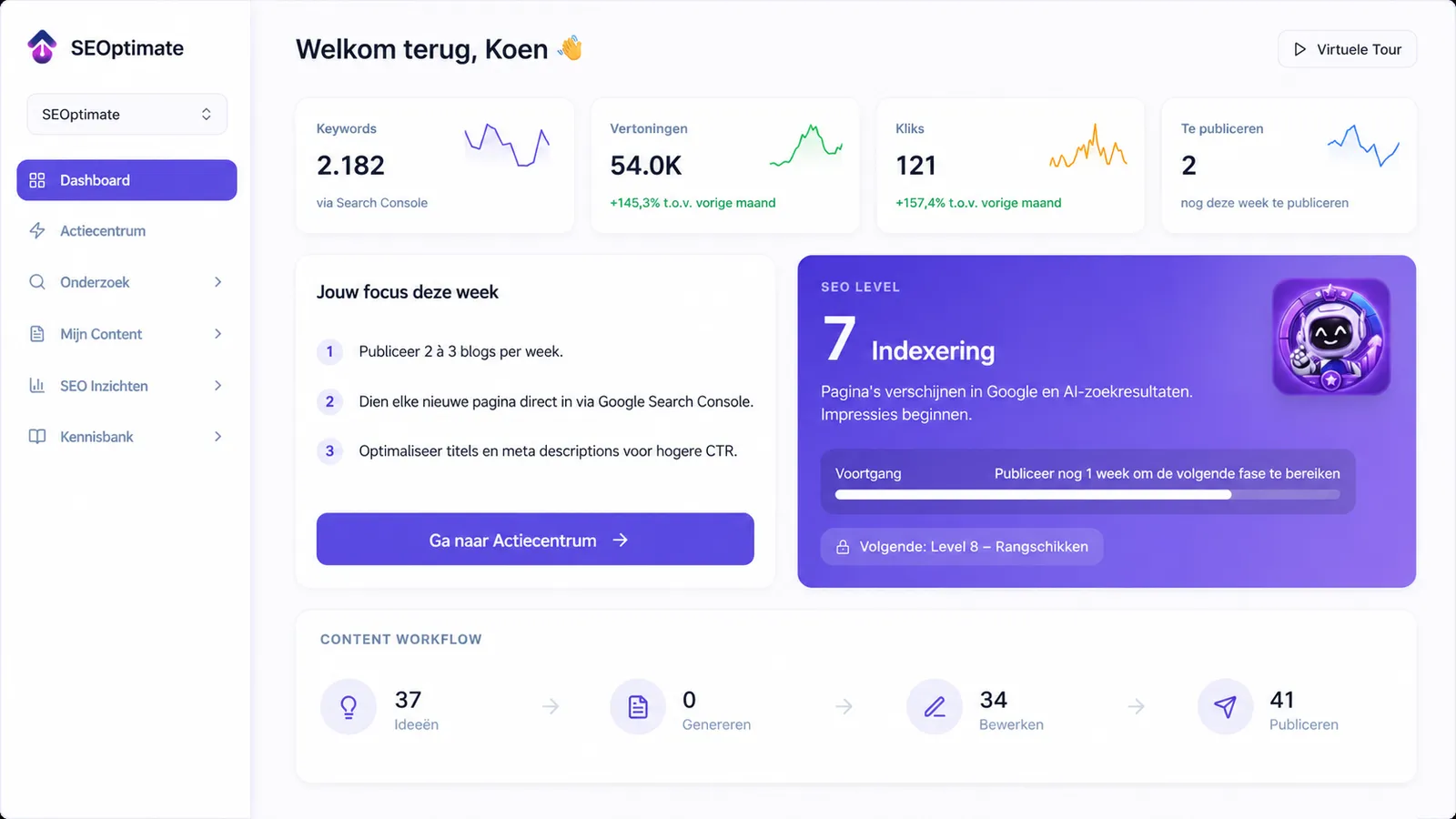
What SEOptimate improves for Webflow sites
Not a generic checklist. These are the four levers that actually move organic traffic on Webflow.
Landing and CMS pages
Build pages that target real keywords and turn your CMS collections into a structure Google understands.
Meta data on every page
Keyword-led titles, meta descriptions and canonicals per static page and per CMS item, instead of one default template.
A content engine in the CMS
Use the Webflow CMS as a blog that answers real questions and feeds your commercial pages.
AI search visibility
Help Google, ChatGPT and AI engines understand and cite your site.
The right content on the right pages adds up. One e-commerce retailer booked +247% organic traffic in six months on the SEOptimate workflow these four phases describe.
Recent SEO results
Real sites growing with SEOptimate.


How it works in four phases
From a design-first Webflow site to one that ranks, in four phases. Open each one for the full checklist.
Phase 1AuditWebflow handles hosting and speed. Set up the parts it leaves to you.
+
Webflow handles hosting and speed. Set up the parts it leaves to you.
- Verify Webflow’s auto-generated sitemap and connect Google Search Console
- Make sure your .webflow.io staging subdomain is not indexed alongside your live domain
- Set 301 redirects in the project settings for every changed or removed URL
- Check which CMS collection pages are indexed and noindex thin or empty templates
Phase 2StructureUse Webflow’s fine-grained control. This is where the platform genuinely shines.
+
Use Webflow’s fine-grained control. This is where the platform genuinely shines.
- Write keyword-led SEO titles and meta descriptions per page and per CMS item
- Use one clear H1 and a logical heading structure in the Designer, not headings picked for looks
- Set canonicals so near-duplicate pages do not compete with each other
- Interlink related pages and CMS items instead of relying on the navigation alone
- Add descriptive alt text to the images in your asset library
Phase 3ContentGive Google something to rank. On most Webflow sites this is the missing piece.
+
Give Google something to rank. On most Webflow sites this is the missing piece.
- Target question and how-to keywords with a CMS-driven blog
- Link each article to one or two commercial pages
- Add Article, FAQPage and BreadcrumbList schema through custom code embeds
- Plan your collections so you stay under the CMS item limits as content grows
- Validate everything in Google’s Rich Results Test
Phase 4GrowthTrack rankings, clicks and AI visibility, then compound what works.
+
Track rankings, clicks and AI visibility, then compound what works.
- Pursue links from niche blogs, partners and press
- Keep internal links flowing to priority pages
- Build branded search demand so Google trusts the site
- Monitor rankings and AI citations and double down on what works

Why we built SEOptimate
For years, I paid an SEO agency hundreds of euros per month. The blogs were full of mistakes, and some keywords they targeted had literally zero search volume.
I built SEOptimate because, as an entrepreneur, I no longer wanted to depend on a marketing agency, or keep paying a premium just to get found online. I ran into this myself with my own webshop, GeheimBiertje: great products, but getting found in Google was anything but easy. SEOptimate is the tool I wish I had back then, now built for any Webflow site.
Choose your path
Do it yourself with the tool
Keep full control. SEOptimate does the heavy lifting: research, writing, publishing and tracking. You stay in the driver’s seat and own your SEO without paying agency rates.
Best for founders and lean teams who want speed and control.
Have us run it with Managed
Hand it over entirely. Our team runs your Webflow SEO end-to-end on your data. Transparent, on your terms and cancel anytime. No black box and no long agency contract.
Best for teams that want results without doing the work.
Book a demoChoose the plan that fits you best
Transparent pricing without hidden costs.
Starter
Get found in Google and AI search engines like ChatGPT, all by yourself. An easy start with SEO and GEO to steadily grow the traffic to your site.
- 1000 content points
- Insight into your competitors
- Personal action center
- Comprehensive analysis
- Magic Rewrite
- 1 Keyword research
- Integration with your website
Basic
Ready to grow further? Create content around multiple topics yourself and get found for more and more searches in Google and AI search engines.
- 2000 content points
- Insight into your competitors
- Personal action center
- Comprehensive analysis
- Magic Rewrite
- 2 Keyword research
- Integration with your website
Pro
For those ready to scale seriously, such as marketers, agencies and owners of multiple sites. Create content for all your websites and dominate in both Google and AI search engines like ChatGPT.
- 4000 content points
- Insight into your competitors
- Personal action center
- Comprehensive analysis
- Magic Rewrite
- 4 Keyword research
- Integration with your website
- Content planner
- Manage up to 3 websites
Managed
Fully done-for-youWe take your online visibility completely off your hands: our team maintains, optimizes and publishes everything for you.
Lite
Forever freePerfect to get started
- 1 blog per month
- 10 ideas per month
- No credit card needed
Frequently asked questions about pricing and the trial
What is Webflow SEO?
Webflow SEO is the practice of making a website built in Webflow findable in search engines and AI models, building on the clean semantic code and fast hosting Webflow ships by default.
In practice you combine Webflow’s strengths (meta fields per page and CMS item, 301 redirects, canonicals and custom code) with a real content strategy. The pitfalls: CMS item limits on large sites, no server-side plugins to lean on, localization and hreflang that take deliberate setup, and beautiful design-first sites with nothing written that can actually rank.
Webflow SEO: frequently asked questions
Is Webflow good for SEO?+
Yes. Webflow ships clean semantic code and fast hosting on a global CDN, and gives you solid built-in controls: meta fields per page and CMS item, 301 redirects, canonicals and custom code. The watch-outs are CMS item limits on large sites, the lack of a plugin ecosystem, and localization that takes extra setup.
Why is my Webflow site not ranking?+
Usually it is not the platform but the content. Many Webflow sites are design-first: a handful of polished pages that target no real keywords. Add thin CMS templates, default meta data or an indexed .webflow.io staging domain and there is little for Google to work with. Work through the four phases above in order to fix that.
Does Webflow have SEO plugins like Yoast?+
No. Webflow has no server-side plugin system, so there is no Yoast equivalent. The core controls are built in, and everything else, like schema markup, runs through custom code embeds. SEOptimate fills the biggest gap: keyword research and the optimized content itself, ready to place in your pages and CMS.
How do I handle multiple languages on Webflow?+
Use Webflow Localization or a translation tool to serve each language on its own URL, and set hreflang tags so Google shows the right version per market. It works well, but unlike a plugin-based setup it does not happen by itself, so plan it deliberately from the start.
Is Webflow good for e-commerce SEO?+
Webflow Ecommerce covers the basics, but it is more limited than Shopify for larger catalogs: fewer product-specific SEO features and apps, and the CMS item limits apply to products too. For a content-driven site with a small shop it works fine; for a big store a dedicated e-commerce platform usually ranks with less friction.
Can I outsource my Webflow SEO?+
Yes. With SEOptimate Managed our team runs the entire process for you on your own data, transparently and cancelable at any time. Unlike a classic agency, you keep ownership and full visibility into exactly what is being done.
Ready to grow your site?
More traffic without an expensive agency.
Pick your path: run it yourself with the tool, or let us take it off your plate.