

The problem
An AI assistant that does not know your website gives generic advice
You ask ChatGPT or Claude what to do about your SEO and get a tidy list back: publish more content, improve your internal links, watch your page speed. All true, and all useless, because the assistant has no idea which of your pages already rank, which keywords earn impressions without a click, and which opportunities SEOptimate has already found for you. You can paste it all in by hand, but that costs half an afternoon and your next question starts the pasting all over again.
With the Claude connection, Claude looks straight into your SEOptimate project and advises on the basis of your own numbers.
What is an SEO MCP server?
An SEO MCP server is a connection built on the Model Context Protocol (MCP), an open standard that lets an AI assistant such as Claude request data from another system, so you ask questions in plain language about your own rankings, pages and opportunities instead of copying numbers across.
The SEOptimate MCP server lives at mcp.seoptimate.com and gives Claude read access to your project: rankings from Google Search Console, the structure and content of your pages, your competitors, your content calendar and the opportunities in the action center. You ask a question, Claude fetches the numbers and explains what it sees. The connection is deliberately advice first: Claude changes nothing on your website, writes no articles and spends no points from your account. What it can do, when you ask, is propose a title and meta description or close an item in the action center. The execution happens in SEOptimate.
How do you connect SEOptimate to Claude?
Three steps, no developer required. You create the key yourself and can revoke it at any moment.
Create a key in SEOptimate
Go to Settings, Integrations and open the Claude card. Name the key and choose whether it covers all your projects or a single one. You see the key once, so copy it straight away.
Add the connector in Claude
Open Claude settings, go to Connectors and choose Add custom connector. Enter https://mcp.seoptimate.com, pick No sign-in and add an X-API-Key header with your key. This works in Claude on the web, in the desktop app and in Claude Code.
Ask your question
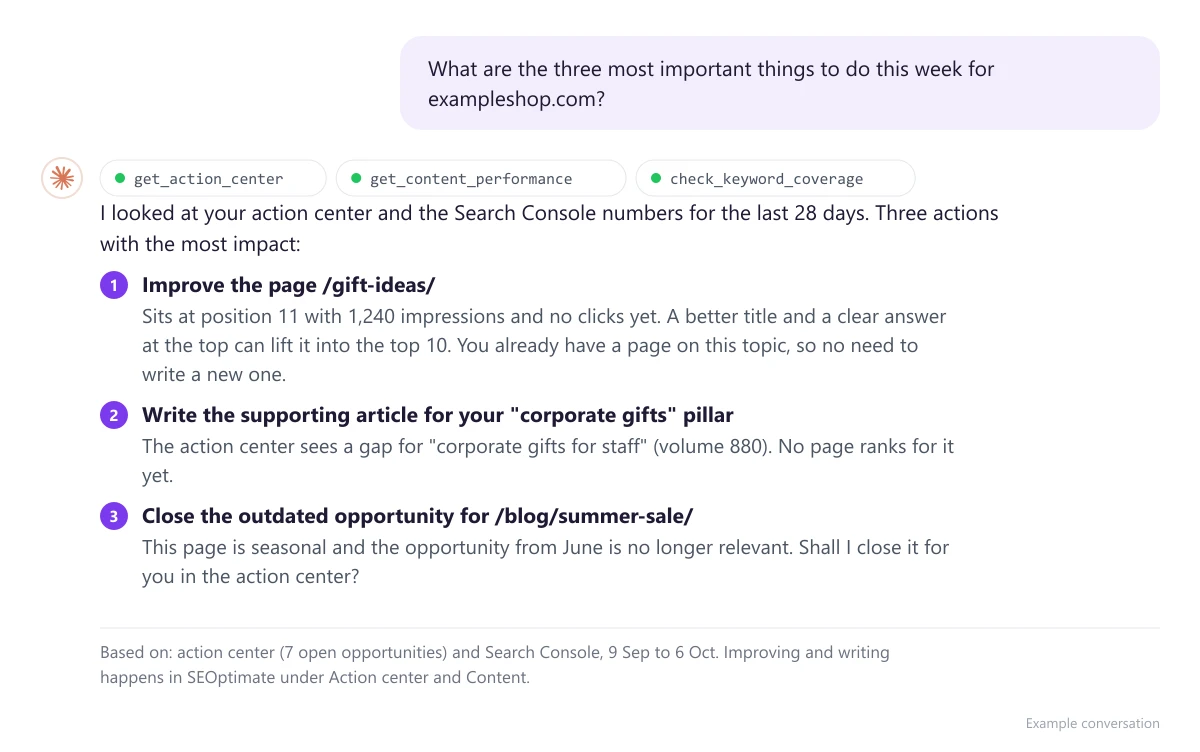
Start a new conversation and ask, for example, what the three most important things to do this week are. Claude fetches your numbers, explains what the advice is based on and points you to the right place in SEOptimate to act on it.
Why is this more than a chatbot with SEO tips?
The difference is the source. Claude is not reasoning about some generic website here, but about your project, with the numbers SEOptimate already collects for you.
Real numbers, live from Search Console
Rankings, clicks and impressions come straight from your connected Search Console, over the last 28 or 90 days. Claude works with what is there today, not with what it once read about SEO.
A strategist who knows your project
Claude sees your action center, your competitors, your content calendar and the rules you set for your brand. It checks whether you already have a page on a subject before it recommends a new one.
Advice first: you decide
The connection can read and propose, not publish. Nothing changes on your website, no articles get started and no points leave your balance. Every small change inside SEOptimate, such as closing an opportunity, happens only at your request.
A key per project, revocable at any time
Per key you decide whether Claude sees all your projects or one, useful for agencies or when you work client by client. Key shared or lost? Revoke it in SEOptimate and the connection stops immediately.
What can Claude see through the connection?
An overview of the sources Claude can request, and the kind of question you can ask about each.
| Source | What Claude fetches | Example question |
|---|---|---|
| Google Search Console | Tracked keywords with clicks, impressions and position, risers and fallers, best performing pages, and newly won or lost keywords. | "Which pages get shown a lot but earn few clicks?" |
| Action center | Every open opportunity SEOptimate has found, with priority and explanation, plus the details per item. | "What are the three most important things to do this week?" |
| Your website | Your site structure, the content and layout of each page, the technical SEO analysis and a search across your own content. | "Do I already have a page on this topic, or should I write a new one?" |
| Content and ideas | Your content ideas, the calendar, the status of pieces in production and the performance of published articles. | "Which of last month's articles are ranking already?" |
| Competitors | Keywords where competitors rank and you do not or rank much lower, and keywords where you win. | "Which keywords is my competitor beating me on?" |
| Keyword research and AI visibility | Keyword research you ran earlier, with volumes and clusters, and whether you get mentioned in AI assistant answers. | "Which keywords from my latest research have no page yet?" |
swipe →
This is what a conversation about your own SEO data looks like
You ask a question in plain language. Claude fetches the numbers from SEOptimate, states what the advice is based on and points you to the place in SEOptimate where you act on it.
Works together with
Claude advises on what SEOptimate collects. These are the features that supply the numbers and let you act on the advice.
Measure per prompt whether you get named in ChatGPT, Gemini, Claude and Perplexity. Through the connection you ask Claude which prompts you still miss and what content they need.
See AI visibilitySearch volume, difficulty and clusters per topic. Claude reads your research and spots the keywords that have no page yet.
See keyword researchYou act on Claude's advice inside SEOptimate: generate an article, improve a page and publish to your CMS, with internal links and FAQ schema.
See the content generatorFrequently asked questions about the Claude connection and MCP
What is MCP exactly?
+
MCP stands for Model Context Protocol, an open standard introduced by Anthropic in late 2024 and now supported by the major AI assistants. An MCP server exposes a fixed set of tools an AI assistant can call, such as "fetch the rankings for this project". The assistant picks the tool that fits your question, retrieves the data and uses it in its answer. The SEOptimate MCP server does exactly that for your SEO data.
Does the connection only work with Claude?
+
The connection is built and tested with Claude: Claude on the web, the desktop app and Claude Code. Because MCP is an open standard, other assistants that support remote MCP servers over HTTP can in principle connect too, but we do not actively test them. That is why the feature is called the Claude connection inside SEOptimate.
What can Claude see, and what can it not see?
+
Claude only sees what lives in your SEOptimate project: your Search Console numbers, your pages, your action center, your content and ideas, your competitors and your keyword research. If a source is not connected, Search Console for example, Claude says so and its advice stays limited on that point. Claude gets no access to your CMS, your billing details or any project the key was not created for.
Can Claude change my website or write articles through the connection?
+
No. The connection is advice first. Claude reads and advises, but publishes nothing, changes nothing on your website and starts no articles or keyword research. What Claude can do, and only when you ask: propose a title and meta description for a page, complete or dismiss an item in the action center, track or exclude a keyword, add a competitor and store a standing writing rule. Those are settings inside SEOptimate, cost no points and can be undone. The real work, such as generating an article or improving a page, happens in SEOptimate.
Does the connection cost extra, or does Claude spend points from my account?
+
The Claude connection is included in the Pro plan, €179 per month billed annually or €199 billed monthly, and is not an add-on. Nothing is deducted from your balance through the connection: every read tool is free, and so is proposing a title and meta description, with a limit of twenty proposals per day per key. On the Claude side you need a Claude plan that lets you add connectors.
Is it safe to give Claude access to my SEO data?
+
Access runs through an API key you create yourself in SEOptimate. SEOptimate stores only a hashed fingerprint of that key, never the key itself, and you see it exactly once. Per key you choose whether it may see all your projects or a single one. You can hold up to ten active keys and revoke any key at any moment, after which the connection stops immediately. Never share a key, because whoever holds it can read your SEO data.
How do I set up the Claude connection?
+
In SEOptimate go to Settings, Integrations and open the Claude card. Name the key, choose its scope and click Create key. Copy the key straight away. Then open Claude settings, go to Connectors and choose Add custom connector. Enter https://mcp.seoptimate.com, pick No sign-in and add a header named X-API-Key with your key as the value. Start a new conversation and ask: "Which projects do I have in SEOptimate?" Do you not see the Claude card in your settings? Send us a message through the feedback button in the app and we will switch it on for you.
Does the connection work for agencies with several clients?
+
Yes. A key can cover every project in your account or exactly one client project. That lets you create a separate key per client, or restrict a key to the one project you are working on right now. In Claude you then name the project your question is about, or you let Claude fetch the project list first. Agency members see the same projects through their own key as they do inside SEOptimate.
Ready to start
Talk to Claude about your own website today
Create a key in SEOptimate, add the connector in Claude and ask your first question. Included in Pro, cancel monthly.
Included in Pro, not a separate module · €179 per month billed annually