



Why owning your SEO beats ads or an agency
Squarespace runs your site, but your organic visibility stays your asset. Ads stop the moment you stop paying, and an agency costs €1,000+ a month while you lose the overview. Organic SEO is something you own that keeps delivering. Build it yourself with SEOptimate, or have it managed, at a fraction of the cost.
- Stops the moment you stop paying
- Rising click costs
- Rented traffic, never an asset
- €1,000+ per month
- A black box with little visibility
- You hand over control
- A lasting asset that compounds
- Transparent, you stay in control
- From €129 a month
Doing it yourself? On Squarespace, watch these four things
No plugins to lean on
Unlike WordPress there is no plugin ecosystem. Everything runs through Squarespace’s built-in SEO settings and, on paid plans, code injection. That keeps your site tidy, but it means the optimization work is on you: titles, descriptions and content do not fix themselves.
Fixed /blog/ and /shop/ URL prefixes
Blog posts and products always live under their collection page, so you cannot remove the /blog/ or /shop/ prefix from those URLs. It is not a ranking killer: keep slugs short and keyword-led, and use Squarespace’s URL mappings to 301-redirect anything you move.
Limited schema options
Squarespace outputs basic structured data automatically, but you cannot install a schema plugin. Extra markup like FAQPage or richer Product details only goes in through code injection, so plan which pages truly need it and keep the rest clean.
Little room for speed optimization
There is no server access, no caching plugin and no way to strip Squarespace’s own scripts. You steer speed with a light template, compressed images and restraint with fonts and animations, and accept that the rest is fixed.
See exactly which Squarespace pages are leaving traffic on the table
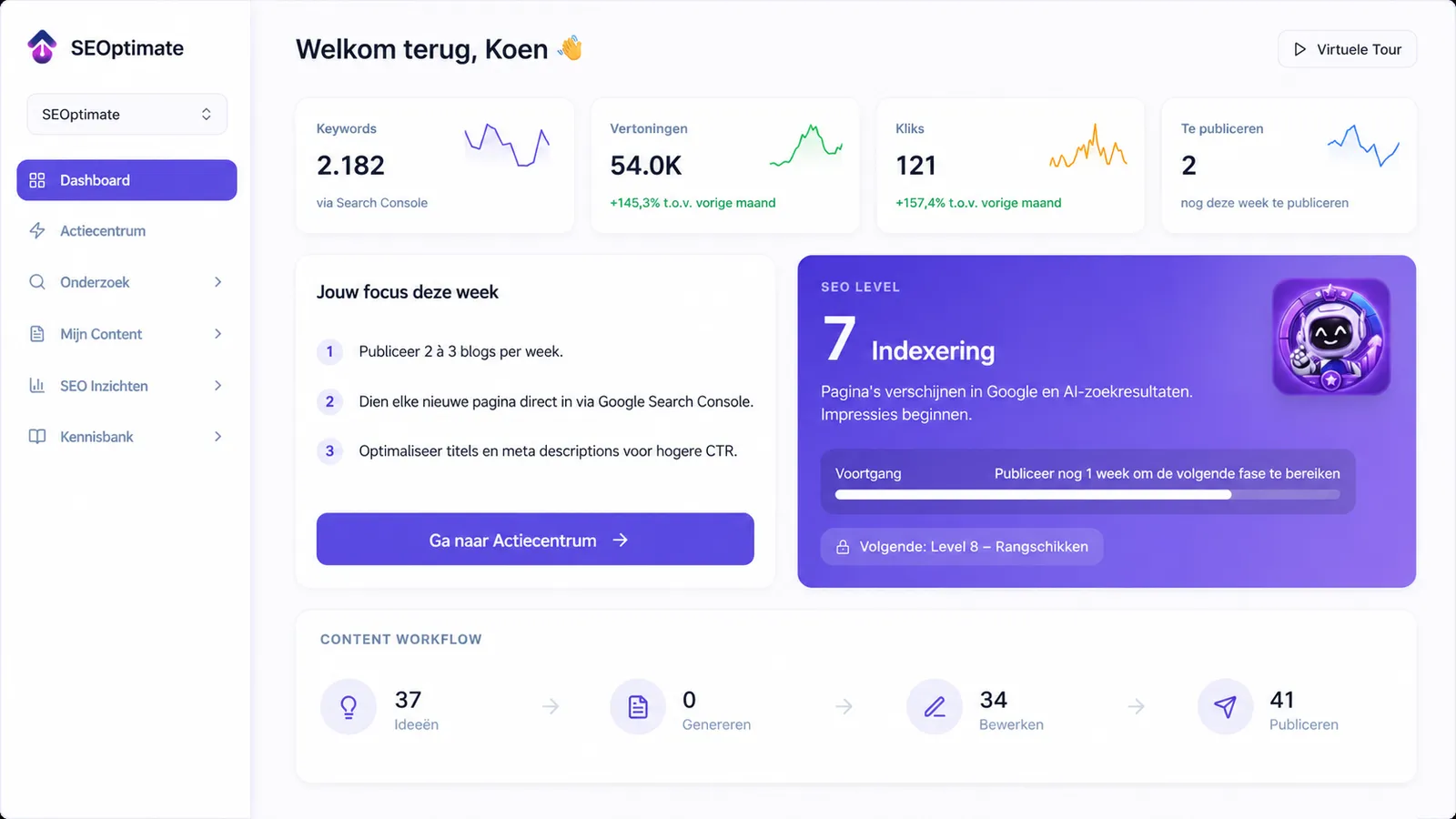
SEOptimate scans your Squarespace site, shows you the pages worth fixing first ranked by estimated impact, and generates the optimized content and meta data, ready to paste into your Squarespace pages.

What SEOptimate improves for Squarespace sites
Not a generic checklist. These are the four levers that actually move organic traffic on Squarespace.
Page titles & structure
Give every page a keyword-led SEO title and description and a clear place in your site structure.
Shop & service pages
Turn your money pages into ranking pages with original copy that matches real buying intent.
Blog as growth engine
Because the tech is largely fixed, the blog is where Squarespace sites win. Publish guides that feed your money pages.
AI search visibility
Help Google, ChatGPT and AI engines understand and cite your site.
The right content on the right pages adds up. One e-commerce retailer booked +247% organic traffic in six months on the SEOptimate workflow these four phases describe.
Recent SEO results
Real sites and stores growing with SEOptimate.


How it works in four phases
From a default Squarespace template to a findable site, in four phases. Open each one for the full checklist.
Phase 1AuditGet the settings right that Squarespace does leave to you.
+
Get the settings right that Squarespace does leave to you.
- Fill the SEO title and description fields on every page, collection and product
- Verify your site in Google Search Console and submit the sitemap Squarespace generates
- Set URL mappings (301 redirects) for any URLs you changed or removed
- Hide thin utility pages from search results with the built-in noindex toggle
Phase 2StructureGive every important page one clear job within Squarespace’s fixed URL structure.
+
Give every important page one clear job within Squarespace’s fixed URL structure.
- Target one primary keyword per page instead of stuffing everything on the homepage
- Keep page and post slugs short and keyword-led; accept the /blog/ and /shop/ prefixes
- Write original product and service descriptions that match search intent
- Interlink service, shop and blog pages instead of relying on the navigation alone
- Pick a light template and go easy on heavy fonts, animations and video banners
Phase 3ContentContent is the real growth channel on Squarespace, because the tech is largely fixed.
+
Content is the real growth channel on Squarespace, because the tech is largely fixed.
- Target question and how-to keywords with the Squarespace blog
- Link each post to one or two money pages
- Add descriptive alt text and compress images before uploading
- Add FAQPage or Product schema through code injection where your plan allows it
- Validate your markup in Google’s Rich Results Test
Phase 4GrowthTrack rankings, clicks and AI visibility, then compound what works.
+
Track rankings, clicks and AI visibility, then compound what works.
- Pursue links from niche blogs, partners and press
- Keep internal links flowing to priority pages
- Build branded search demand so Google trusts the site
- Monitor rankings and AI citations and double down on what works

Why we built SEOptimate
For years, I paid an SEO agency hundreds of euros per month. The blogs were full of mistakes, and some keywords they targeted had literally zero search volume.
I built SEOptimate because, as an entrepreneur, I no longer wanted to depend on a marketing agency, or keep paying a premium just to get found online. I ran into this myself with my own webshop, GeheimBiertje: great products, but getting found in Google was anything but easy. SEOptimate is the tool I wish I had back then, now built for any Squarespace site.
Choose your path
Do it yourself with the tool
Keep full control. SEOptimate does the heavy lifting: research, writing, publishing and tracking. You stay in the driver’s seat and own your SEO without paying agency rates.
Best for founders and lean teams who want speed and control.
Have us run it with Managed
Hand it over entirely. Our team runs your Squarespace SEO end-to-end on your data. Transparent, on your terms and cancel anytime. No black box and no long agency contract.
Best for sites that want results without doing the work.
Book a demoChoose the plan that fits you best
Transparent pricing without hidden costs.
Starter
Get found in Google and AI search engines like ChatGPT, all by yourself. An easy start with SEO and GEO to steadily grow the traffic to your site.
- 1000 content points
- Insight into your competitors
- Personal action center
- Comprehensive analysis
- Magic Rewrite
- 1 Keyword research
- Integration with your website
Basic
Ready to grow further? Create content around multiple topics yourself and get found for more and more searches in Google and AI search engines.
- 2000 content points
- Insight into your competitors
- Personal action center
- Comprehensive analysis
- Magic Rewrite
- 2 Keyword research
- Integration with your website
Pro
For those ready to scale seriously, such as marketers, agencies and owners of multiple sites. Create content for all your websites and dominate in both Google and AI search engines like ChatGPT.
- 4000 content points
- Insight into your competitors
- Personal action center
- Comprehensive analysis
- Magic Rewrite
- 4 Keyword research
- Integration with your website
- Content planner
- Manage up to 3 websites
Managed
Fully done-for-youWe take your online visibility completely off your hands: our team maintains, optimizes and publishes everything for you.
Lite
Forever freePerfect to get started
- 1 blog per month
- 10 ideas per month
- No credit card needed
Frequently asked questions about pricing and the trial
What is Squarespace SEO?
Squarespace SEO is the practice of making a Squarespace site findable in search engines and AI models, on a platform that handles the technical basics for you but limits what you can change.
In practice Squarespace gives you a clean foundation out of the box: SSL, mobile-friendly templates, automatic sitemaps and canonical tags. What you do not get is plugins, free control over the /blog/ and /shop/ URL structure, server access or deep schema options. That makes content and on-page optimization the levers that actually decide your rankings.
Squarespace SEO: frequently asked questions
Is Squarespace good for SEO?+
Better than its reputation. Squarespace handles the technical basics automatically: SSL, mobile-friendly templates, clean sitemaps and canonical tags. The limits are real (no plugins, fixed URL prefixes, limited schema and speed control), but for most sites rankings are decided by content, and that is fully in your hands.
Why is my Squarespace site not ranking?+
It is usually not the platform. Common reasons are empty SEO title and description fields, thin pages that target no clear keyword, little or no blog content, and weak internal links. Work through the four phases above in order to fix them.
Can I remove the /blog/ or /shop/ prefix from my Squarespace URLs?+
No. Blog posts and products always live under their collection page, so that part of the URL is fixed. It is not a ranking problem in itself: keep your slugs short and keyword-led, and use URL mappings to 301-redirect any URLs you change.
Does Squarespace support schema markup?+
Squarespace adds basic structured data automatically, and there are no plugins to extend it. Extra markup such as FAQPage schema only goes in through code injection on paid plans. Focus it on the few pages where a rich result genuinely helps.
Can I outsource my Squarespace SEO?+
Yes. With SEOptimate Managed our team runs the entire process for you on your own data, transparently and cancelable at any time. Unlike a classic agency, you keep ownership and full visibility into exactly what is being done.
Ready to grow your site?
More traffic without an expensive agency.
Pick your path: run it yourself with the tool, or let us take it off your plate.